

Automate These First: Your Guide to Eliminating Repetitive Work
The recurring task you dread every Tuesday morning, or the endless data entry that eats into your strategic planning time? It’s not just a nuisance; it’s a drain on your productivity and potential. Imagine reclaiming an hour each day from tasks you do on autopilot, freeing you to focus on high-impact work. But where do you even begin to untangle the web of daily drudgery and truly make automation work for you?
Quick summary for busy readers:
- Start small: Target high-frequency, low-complexity tasks first for quick wins and confidence.
- Optimize before automating: Always refine your manual process to ensure you’re not automating existing inefficiencies.
- Maintain human oversight: Leverage AI for speed, but always retain final human approval for critical or sensitive outputs.
Pinpointing Your Automation Opportunities
To maximize your impact, the first step is to identify which tasks are best suited for automation. Not every task is a good candidate, so focus on the ones that offer the most return for your effort.
- Audit your daily and weekly tasks: Take a notepad or open a spreadsheet and list every repetitive, rule-based task you perform regularly, no matter how small. Think about things like sending routine emails, moving data between systems, generating standard reports, or organizing files.
- Prioritize tasks for automation: Once you have your list, evaluate each task. Which ones are most time-consuming? Which are most prone to human error? Which do you perform most frequently? These are your prime candidates for automation because streamlining them will have the biggest impact on your day.
- Look for ‘if-then’ scenarios: Tasks that follow a clear set of rules or conditions are ideal for automation. For example, “IF an email arrives from [specific sender] AND it contains [keyword], THEN move it to [specific folder].” Or, “IF a new entry is added to [spreadsheet], THEN create a task in [project management tool].”
Choosing the Right Tools for the Job
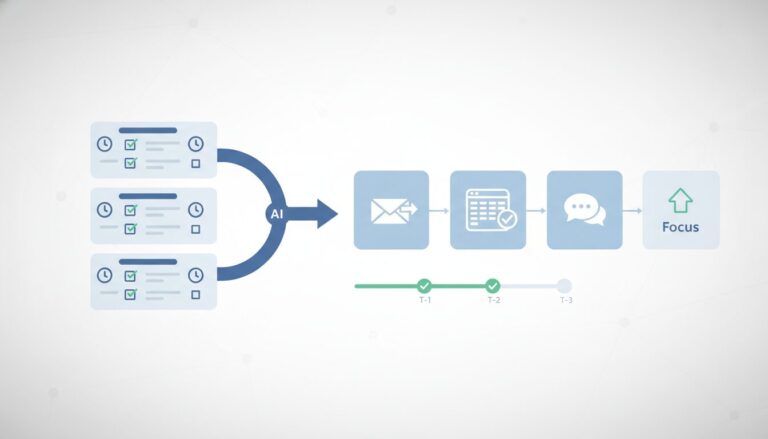
Once you know what you want to automate, the next step is to select appropriate automation and AI tools that align with your existing software and needs.
- Research and select tools: Explore options based on your needs. For connecting different apps and orchestrating processes, tools like Zapier, Make (formerly Integromat), or Microsoft Power Automate are excellent. For specialized tasks, you might look into AI tools for writing (like large language models), data extraction (like OCR software), or scheduling (like AI-driven assistants).
- Ensure integration: This is crucial. Prioritize tools that seamlessly connect with the software you already use daily – your CRM, email client (Gmail, Outlook), project management tools (Asana, Trello), spreadsheets (Excel, Google Sheets), and communication platforms (Slack, Microsoft Teams). An automation tool is only as good as its ability to talk to your existing systems.
- Consider complexity vs. ease of use: If you’re new to automation, start with platforms known for their user-friendly interfaces and drag-and-drop builders. As you gain confidence and your needs evolve, you can gradually explore more powerful or specialized tools. Don’t try to tackle a complex enterprise-level solution for your first project.
Building Your First Automated Workflow (and Testing It Right)
With your task identified and your tool chosen, it’s time to build your first automated workflow. This section provides a step-by-step guide to setting up and verifying your automation, emphasizing thorough testing.
- Map out the workflow: Before you touch any software, clearly define each step of the manual task. Then, visualize how the automation tool will execute it. Draw it out, write it down, or use a simple flowchart. What is the trigger? What are the subsequent actions? What data needs to be passed between steps?
- Configure the automation: Follow your chosen tool’s instructions. This usually involves:
- Selecting a “trigger” app and event (e.g., “New email in Gmail”).
- Choosing an “action” app and event (e.g., “Create task in Asana”).
- Mapping data fields between the trigger and action (e.g., “Email subject” becomes “Task name”).
- Build and test rigorously: This is arguably the most critical step. Don’t just test with ideal scenarios. Run thorough tests with real-world data, including edge cases or unusual inputs you might encounter. What happens if a field is empty? What if the data format is slightly different? Identify and fix any issues or unexpected behaviors.
- Iterate and refine: Don’t expect perfection on the first try. Automation is an iterative process. Be prepared to tweak and optimize your workflow based on testing feedback. You might discover a more efficient way to structure a step or a condition you overlooked.
Common Automation Pitfalls and How to Avoid Them
While automation offers immense benefits, there are common mistakes that can derail your efforts. Being aware of these can save you a lot of frustration.
- Mistake 1: Automating a broken or inefficient process.
Many people attempt to automate a task without first optimizing the underlying manual process. This often leads to automating errors or inefficiencies, making the problem worse or simply faster at being wrong.
Prevention: Critically analyze and refine your manual process before automating it. Ask yourself: Is this task truly necessary? Can any steps be eliminated or simplified? Ensure the manual process is logical, efficient, and truly necessary before you build an automated version.
- Mistake 2: Over-automating or trying to automate everything at once.
Professionals can get overwhelmed by trying to automate too many complex tasks simultaneously or attempting to build an overly intricate system from the start. This often results in a fragile, hard-to-debug system that quickly breaks down.
Prevention: Adopt an incremental approach. Start with one simple, high-impact task. Master its automation, build your confidence, and then gradually expand to more complex workflows.
- Mistake 3: Neglecting human oversight and review.
Relying entirely on AI-driven automation without any human checkpoints, especially for critical outputs (e.g., client communications, financial reports), can lead to significant errors, misinterpretations, or inappropriate responses. AI, while powerful, can lack nuance or context, leading to ‘hallucinations’ or logical mistakes that only a human can catch.
Prevention: Design automation workflows with strategic human review points. Use AI for drafting or initial processing, but always retain final human approval for sensitive or critical tasks. Remember, automation is a tool to augment your capabilities, not replace your critical thinking or human judgment.
Real-World Examples: What You Can Automate Today
To help you get started, here are some practical examples of automation relevant to office professionals:
- Automating Email Management: Use AI tools or email rules to draft common responses, categorize incoming messages into specific folders (e.g., “Urgent,” “Reading List”), or summarize long email threads, saving significant time on communication.
- Streamlining Data Entry and Processing: Implement AI-powered OCR (Optical Character Recognition) tools to extract specific data from invoices, forms, or scanned documents and automatically input it into spreadsheets or CRM systems. This eliminates tedious manual typing.
- Generating Initial Content Drafts: Utilize large language models (LLMs) like ChatGPT or specialized content AI tools to create first drafts of reports, marketing copy, social media posts, or meeting summaries. You can then refine and personalize these drafts, significantly reducing initial writing time.
- Automating Meeting Scheduling and Preparation: Employ AI-driven scheduling assistants (e.g., integrations with Calendly or specialized meeting bots) to find optimal meeting times, send invitations, and even generate preliminary agendas based on past discussions or topics.
Automation Checklist:
- Have you audited your daily/weekly tasks for repetitive work?
- Is the manual process optimized and efficient before automation?
- Have you selected an automation tool that integrates with your existing software?
- Is your automated workflow clearly mapped out, step-by-step?
- Have you thoroughly tested your automation with real-world scenarios?
Embrace a ‘think automation first’ mindset for any repetitive task you encounter. Don’t be afraid to experiment with different tools and approaches; the best solution often comes through trial and error. Remember that automation is a powerful tool to augment your capabilities, not replace your critical thinking or human judgment. Regularly revisit your automated workflows to ensure they remain relevant, efficient, and aligned with your evolving needs, freeing you to focus on what truly matters.
- [1]
Google Workspace Learning Center
Official guidance for reducing repetitive work